
Camera
Cameras are recurring Items in The Legend of Zelda series.[1][2][name references needed]
Location and Uses
Tri Force Heroes
In Tri Force Heroes, the Camera is given to Link by the Photo Bro at the Miiverse Gallery. The Camera is used to take screenshots of Levels of the Drablands by pressing the 'X' button; after the Level's completion, the most recent screenshot to be taken is saved to the Miiverse Gallery's photo album. Up to 99 photos can be saved to the photo album; the photos can be posted onto Miiverse from the Miiverse Gallery,[note 1] and unwanted photos can be deleted from the photo album. The Camera cannot be used outside of the Drablands or in Download Play.[3]
Breath of the Wild
In Breath of the Wild, the Camera appears as a Rune on the Sheikah Slate. It is an ancient piece of Sheikah technology.[4] It is obtained in the Hateno Ancient Tech Lab from Purah after bringing Blue Flame to the Ancient Furnace outside of the Lab. Link must place the Sheikah Slate into the Guidance Stone in the Lab to repair the Slate and restore missing files. Doing so will add the Camera Rune, the Album, and the Hyrule Compendium to the Sheikah Slate.[5] With the Hyrule Compendium, Link also receives the Sheikah Sensor +. After obtaining the Camera Rune, Purah asks Link to try it out by taking a Picture of her.[6]
The Camera Rune allows Link to take a Picture by pressing the 'A' button, which is saved to the Album.[7] Link can aim the Camera with either the right analog stick or the gyroscope. Link can zoom in and out by pressing up and down on the D-pad. Link can also quickly access the Album by pressing the minus button and take a Self-Portrait by pressing the 'X' button. While taking a Self-Portrait, Link can position himself in four different poses by using the left analog stick.
If Link takes a Picture of certain creatures, monsters, Materials, Treasure Chests, Ore Deposits, or pieces of equipment, it will be logged in the Hyrule Compendium.[8] After being logged, Link can view information about the subject in the Compendium or track it with the Sheikah Sensor +.
The Camera's Album comes with twelve Old Landscape Photos that were taken by Princess Zelda 100 years ago.[9] After obtaining the Camera Rune and speaking to Impa, she will instruct Link to go to each location in all of Zelda's Pictures to recover his Memories.[10] By visiting these locations, Link will experience a flashback of a Memory with Zelda where the Picture was taken.
Tears of the Kingdom
The Camera is unlocked during "Camera Work in the Depths" Main Quest.
Other Appearances
Hyrule Warriors: Age of Calamity
The Camera Rune is featured as a crucial part of Zelda's Special Attack when she is using her starting weapon class, which is Sheikah Runes.
Nomenclature
 Names in Other Regions Names in Other Regions  | ||
|---|---|---|
| Language | Names | Meanings |
 Japanese |
| |
   ChineseTR | 視角操作 (Shìjiǎo cāozuò) (TotK) | |
 ChineseSI | 照相机 (Zhàoxiàngjī) (BotW | TotK)[19][20] | Same as English. |
 Dutch | Foto's (BotW | TotK)[14][15] | Photos |
 FrenchEU | Appareil photo (TFH | BotW | TotK)[13] | Camera |
 FrenchCA | Appareil photo (TFH | TotK)[21] | |
 German |
| |
 Italian |
| |
 Korean |
| |
 SpanishLA | Cámara (TFH)[16] | |
 SpanishEU | Cámara (TFH | TotK) | |
| This table was generated using translation pages. To request an addition, please contact a staff member with a reference. | ||
Gallery
-
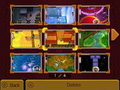
The photo album menu from Tri Force Heroes
-
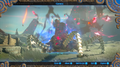
A Guardian Stalker being pictured with the Camera Rune from Breath of the Wild


See Also
Notes
- ↑ The Miiverse service was discontinued on November 7, 2017.
References
- ↑ "Camera
Instantly render a visible image into a picture.
Pictures created are saved in the album. It has a useful feature that connects to the Hyrule Compendium and automatically registers pictures of new entries." — Runes (Breath of the Wild) - ↑ "Camera
Capture images using the Purah Pad. You can then save them to the album." — Inventory (Tears of the Kingdom) - ↑ "In the full version, photos can be freely taken within levels." — N/A (Tri Force Heroes)
- ↑ "A Camera is a type of ancient Sheikah technology that allows you to capture the image of a person or object." — Camera Manual (Breath of the Wild)
- ↑ "Camera, Hyrule Compendium, and album missing files confirmed. Starting repair." — Guidance Stone (Breath of the Wild)
- ↑ "Take a picture of me with the Camera! Oh, and don't forget to lemme see it!" — Purah (Breath of the Wild)
- ↑ "Pictures you take with the Camera are stored in the album." — Symin (Breath of the Wild)
- ↑ "Pictures of animals and objects will be automatically registered in the Hyrule Compendium." — Purah (Breath of the Wild)
- ↑ "Yes, there are also some old landscape photos stored in the album. I knew Princess Zelda had made frequent use of the Camera feature, but this..." — Purah (Breath of the Wild)
- ↑ "Princess Zelda's memories are your memories as well. Visit the locations chronicled by the Camera, and you may be able to recover bits of your memory." — Impa (Breath of the Wild)
- ↑ "Hai ottenuto la fotocamera!" — N/A (Tri Force Heroes)
- ↑ "カメラを手に入れた!" — N/A (Tri Force Heroes)
- ↑ "Vous avez obtenu un appareil photo !" — N/A (Tri Force Heroes)
- ↑ "Foto's" — Sheikah Slate (Breath of the Wild)
- ↑ "Foto's" — Inventory (Tears of the Kingdom)
- ↑ "¡Has conseguido la cámara!" — N/A (Tri Force Heroes)
- ↑ "Kamera erhalten!" — N/A (Tri Force Heroes)
- ↑ "카메라를 획득했다!" — N/A (Tri Force Heroes)
- ↑ 照相机 (Sheikah Slate)
- ↑ "照相机" — Inventory (Tears of the Kingdom, Simplified Chinese localization)
- ↑ "Vous avez obtenu un appareil photo!" — N/A (Tri Force Heroes)