Multifunction Settings
The Multifunction Settings menu is an interface in Hyrule Warriors: Definitive Edition.[2]
Overview
The Multifunction Settings menu is a submenu of the Button Settings menu. The Multifunction Settings can be accessed by playing with one Joy-Con. The Multifunction Settings allows the player to see what button combinations can be pressed to do certain actions while playing with one Joy-Con.[1] Most actions that can be performed require the multifunction button, SR.[3]
While playing with a right Joy-Con, pressing SR and SL will use Focus Spirit.[4] Pressing SR and Plus will toggle the Map.[5] Pressing SR and A will cycle through all playable Warriors.[6] Pressing SR and B or SR and X will cycle through the Warrior's Items.[7][8] Pressing SR and Y will use the selected Item.[9] Pressing SR and pressing the Right Stick down will use Fairy Magic.[10]
While playing with a left Joy-Con, pressing SR and SL will use Focus Spirit.[4] Pressing SR and Minus will toggle the Map.[11] Pressing SR and pushing the Right Stick down will use Fairy Magic.[10] Pressing SR and up will use the selected Item.[12] Pressing SR and left or right will cycle through the Warrior's Item.[13] Lastly, pressing SR and down will switch Warriors.[14]
Nomenclature
 Names in Other Regions Names in Other Regions  | ||
|---|---|---|
| Language | Names | Meanings |
 FrenchCA | Commandes combinées (HWDE) | Combined orders |
 FrenchEU | Commandes combinées (HWDE)[17] | Combined orders |
 German | Multifunktionale Einstellung (HWDE)[16] | Multifunctional setting |
 Italian | Impostazioni multifunzione (HWDE)[15] | Multifunction settings |
 SpanishLA | Ajustes multifunción (HWDE)[18] | Multifunction settings |
 SpanishEU | Ajustes multifunción (HWDE) | Multifunction settings |
| This table was generated using translation pages. To request an addition, please contact a staff member with a reference. | ||
Gallery
-
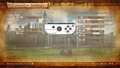
The Multifunction Settings while playing with one right Joy-Con

See Also
References
- ↑ 1.0 1.1 "Check the functionality of holding SR." — Multifunction Settings (Hyrule Warriors: Definitive Edition)
- ↑ "Multifunction Settings" — Button Settings (Hyrule Warriors: Definitive Edition)
- ↑ "
 Multifunction Button" — Button Settings (Hyrule Warriors: Definitive Edition)
- ↑ 4.0 4.1 "
 Focus Spirit" — Multifunction Settings (Hyrule Warriors: Definitive Edition)
- ↑ "
 Toggle Map" — Multifunction Settings (Hyrule Warriors: Definitive Edition)
- ↑ "
 Switch Warriors" — Multifunction Settings (Hyrule Warriors: Definitive Edition)
- ↑ "
 Cycle Items" — Multifunction Settings (Hyrule Warriors: Definitive Edition)
- ↑ "
 Cycle Items" — Multifunction Settings (Hyrule Warriors: Definitive Edition)
- ↑ "
 Use Item" — Multifunction Settings (Hyrule Warriors: Definitive Edition)
- ↑ 10.0 10.1 "
 Fairy Magic" — Multifunction Settings (Hyrule Warriors: Definitive Edition)
- ↑ "
 Toggle Map" — Multifunction Settings (Hyrule Warriors: Definitive Edition)
- ↑ "
 Use Item" — Multifunction Settings (Hyrule Warriors: Definitive Edition)
- ↑ "
 Cycle Items" — Multifunction Settings (Hyrule Warriors: Definitive Edition)
- ↑ "
 " — Multifunction Settings (Hyrule Warriors: Definitive Edition)
- ↑ "Impostazioni multifunzione" — Button Settings (Hyrule Warriors: Definitive Edition)
- ↑ "Multifunktionale Einstellung" — Button Settings (Hyrule Warriors: Definitive Edition)
- ↑ "Commandes combinées" — Button Settings (Hyrule Warriors: Definitive Edition)
- ↑ "Ajustes multifunción" — Button Settings (Hyrule Warriors: Definitive Edition)


